Posts

Portfolio site completion and humble job seeking
Image
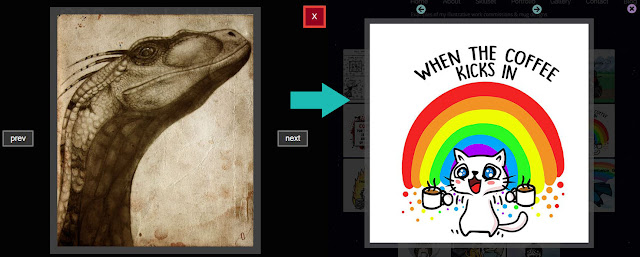
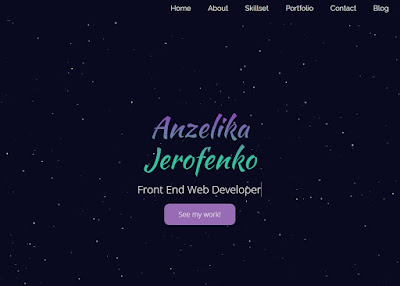
Today is a very happy day. Spent around a week of polishing, but here it is: https://anzudev.com. My web-home is ready! Here it is on mobile view (600px viewport) I learned a lot during these last days, especially since the site is using vanilla CSS/HTML. So I went back to Flexbox basics to make sure my images and content line up in all screen sizes. Gallery was the biggest challenge, since I was relying on Bootstrap's Lightbox so much. But after some googling I found a nifty solution I could restyle for my own site. Here is a before/after. The buttons felt a bit 1999, so I used Awesome Icons instead and positioned them on top instead of on the sides. After adding the personal section where witch hats and cats were mandatory of course, I finally felt ready to do the thing I've dreaded for a while: start to search for real life jobs in front end field. Since I'm self taught with no computer science university degree it's easy to feel inferior, but today I s...

Florian's portfolio/resume site project

Image
Today has been an immensely rewarding day! My partner was having a bit of a low day at work, since he is currently actively seeking better fitting employment, and he casually said whether perhaps a website would make his applications stand more out. I reckon he did not expect me to dive headfirst into Bootstrap templates to build him one in a few hours by the time he got back! Since he is a technical engineer, I wanted to make it a bit thematic and include some animated gears. That was hell of a lot of fun, since my partner immediately stepped into the "client" shoes and demanded the cogwheels to turn fast and ferociously. Luckily I managed to convince him that it would be counterproductive, since it would distract the viewer from the actual content. Now there are slowly, yet surely rotating gears on his personal site, and I swore on my pinky that these gears will be the reason he secures an interview, because they beat boring resumes any day! Domain shopping went smoothl...

My portfolio creation

Image
The time has come! To craft my very own site, my gem, my business card to the Front End world, my creative baby! *jumps around excitedly* I knew that I wanted my own site to incorporate all of this: animated backdrop of particles I fell in love with a few weeks ago (Github here ) mobile responsiveness dark backdrop and light text smooth animations for changing sections no CSS framework (Bootstrap/Semantics) to practice positioning the whole site from scratch one pager with a toggle menu to follow the contemporary trends fresh feel, big clear elements When browsing for inspiration I found  this  tutorial that pretty much covered all the above. It also involves practicing all of this: vanilla CSS, positioning all elements by yourself via flexbox. Good chance to practice the basic understanding of how positioning and display attributes work jQuery. Toggle menu and animations are supported by jQuery, allowing me to familiarise  myself with that syntax and...

JS course penguins and form events

Image
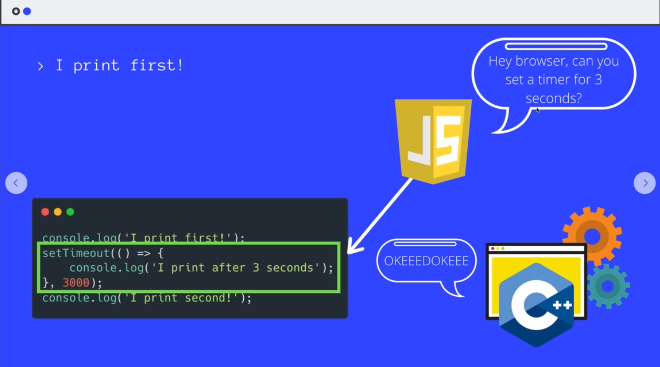
Hacking away at Colt Steele's JS course! We've now reached Javascript events and from the simple coin game demo I developed my own version featuring penguins and hearts because.. I'm nothing but cheesy after all  ^^ Here's the site. It's a really basic exercise of creating addEventListeners based on keyboard events (arrow keys) and moving the heart around in a random location once the penguin reaches it. I went for the extra mile and figured out how to add a temporary "uh-oh!" message once the heart is reached and.. sadly goes away again. The neverending quest for love, ey? :) The course moved on to form events and that's when it got really tricky. The mixed use of conditionals, destructuring, eventListeners and loops really puts your logical grasp on a test. For example this code snippet is looping through user inputs and updating the values in a formData object simultaneously as the user types. I coded along, but still squinted at it like a bab...

Czocha website project

Image
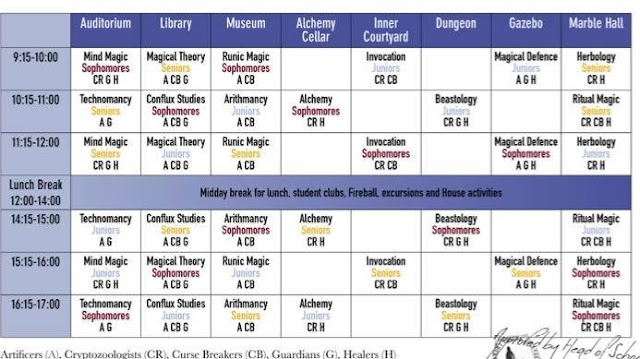
Summing up several days here. Absolutely beautiful when inspiration strikes! Decided to finish the website/app idea I had for my upcoming larp. It was a bit of a pain to find out your timetable from plethora of options below: For example when my character is a Sophomore Curse Breaker (CB), I had to fingertrace the table cells that would include Sophomores and CB both. So, the idea is to have an easier way to have your personalised timetable at your fingertips. Here it is! Boy, making that was a creative and logical adventure. For mobile responsiveness decided to go with Bootstrap 4 and a simple interface, even though I found a beautiful picture of the castle as a backdrop. Things I learned putting the site together: How to center align items Practicing in line icons/pictures for added eyecandy How to utilise Bootstrap grid to resize/adjust items in different viewport widths Testing different navbar designs, settling on pills Purchasing a domain and hosting it via Github. T...

JS function challenges

Image
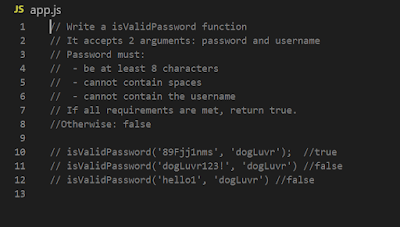
Alright, today I am halfway done going through the basics, and now the course has reached practical assignment bit. Time to write some code independently! Task 1: password validator: The below (Colt's solution) would have been sufficient: function isValidPassword ( password , username ) { if ( password . length < 8 ) { return false ; } if ( password . indexOf ( ' ' ) !== - 1 ) { return false ; } if ( password . indexOf ( username ) !== - 1 ) { return false ; } return true ; } But I wanted to take it a bit further with the messaging. After all, in real life projects, the user wants to know WHY her input was not accepted , right? Trickiest part was to figure out how to inform the user if multiple conditions about their passwords were incorrect. I began with making a standard loop with if+else if and then realised the code looks no further as the first condition is met. Ugh. So, this is what I came up with in the e...

Brushing dust from Javascript basics

Image
Aaaand off I go with the Javascript course! I sure am missing my dual screen set up back home, so I improvised with my tablet which I now use to play the Udemy video. Feels nice to make some basic scripts and loops. With reinstalling Windows some of my VS set-up went missing, so today I rediscovered Live Server plugin which makes coding a dream. Every time you save a HTML/CSS/JS file it automatically refreshes your html to see the effects. I split my screen, allowing me to see the new script logs immediately. Since I went through JS in the original Bootcamp, I pretty much skim through the basics. I don't want to skip them entirely since it does not feel intuitive anymore to write basic JS and also because Colt uses really cool examples of illustrating the methods. First time I've used indexOf method to evaluate if a string includes a forbidden character for example (visible on the screenshot above). "How absolutely marvellous" , I say, while sipping coffee. ...